
How to Renew Your Domain Name
Last updated: August 2025
Applies to: Customers with domains registered through us or an external registrar
Estimated time: 5 minutes
Overview
Your domain name is the address on the internet of your website. If it expires, your visitors won’t be able to reach your site, and you could risk losing the domain to someone else. This article will walk you through the steps to renew your domain—whether your domain is registered directly with us or another registrar.
Before You Begin
Make sure:
- You know who your domain registrar is (your registrar may be different from your hosting company).
- You have the login details for your hosting account and/or registrar.
- You have a valid payment method on file.
Tip: You can check your domain’s registrar by doing a WHOIS Lookup.
Steps to Renew Your Domain (Registered With Us)
- Log in to Your Hosting Account
- Please enter your username and password on our login page.
- Access the Domain Management Area
- In your dashboard, find the section labeled Domains.
-

- Locate Renew Your Domain
- Find Renew Domains on the sidebar under Actions.
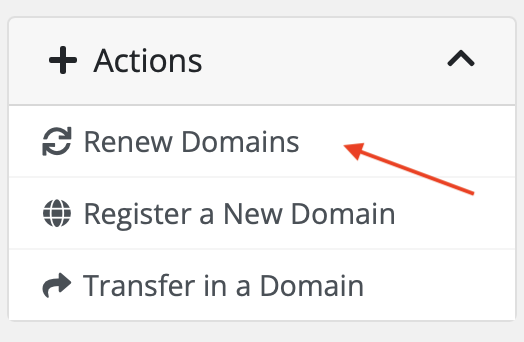
- Renew Your Domain
- Click Renew or Extend Registration.
- Select the renewal period (usually 1–10 years).
- Confirm your payment details and submit.
- Check for Confirmation
- You’ll receive a confirmation email once the renewal is successful.
Steps to Renew Your Domain (Registered Elsewhere)
If your domain is with another registrar (e.g., GoDaddy, Namecheap, Google Domains), you’ll need to renew it through their platform:
- Log in to Your Registrar’s Account
- Visit your registrar’s website and enter your credentials.
- Navigate to Domain Management
- Look for a section like My Domains or Domain List.
- Select the Domain to Renew
- Click on the domain name to view renewal options.
- Complete the Renewal Process
- Choose your renewal term and payment method.
- Update Nameservers (if needed)
- If your hosting remains with us, ensure your nameservers point to our servers after renewal.
Enable Auto-Renew (Recommended)
To avoid future lapses:
- Enable Auto-Renew in your hosting or registrar account.
- Keep your payment method updated.
Important Notes
- Domains usually enter a grace period after expiration, but renewal costs may increase.
- After the grace period, your domain may enter redemption—renewal can be more expensive and is not always guaranteed.
- Some domain extensions (.com, .net, .org) follow ICANN rules; country-specific domains may have different policies.
Need Help?
If you’re unsure where your domain is registered or have issues during renewal, our support team is here to help 24/7.
Contact Support: support@worksonline.host
Create a trouble ticket by logging into your account or Chat us